Top 5 MCP servers for crypto trading, tested side by side
We installed five crypto MCP servers — ccxt-mcp, OKX Agent Trade Kit, Bybit, TradingView MCP and mcp-server-ccxt — and ran the same live tests on each, from latency and context cost to WebSocket streaming and API-key safety.
By CCXT Team
MCP (the Model Context Protocol) lets an AI agent call real tools: pull prices, read order books, place orders. Dozens of crypto MCP servers exist, so we picked five, installed each one and ran the same live tests on all of them.
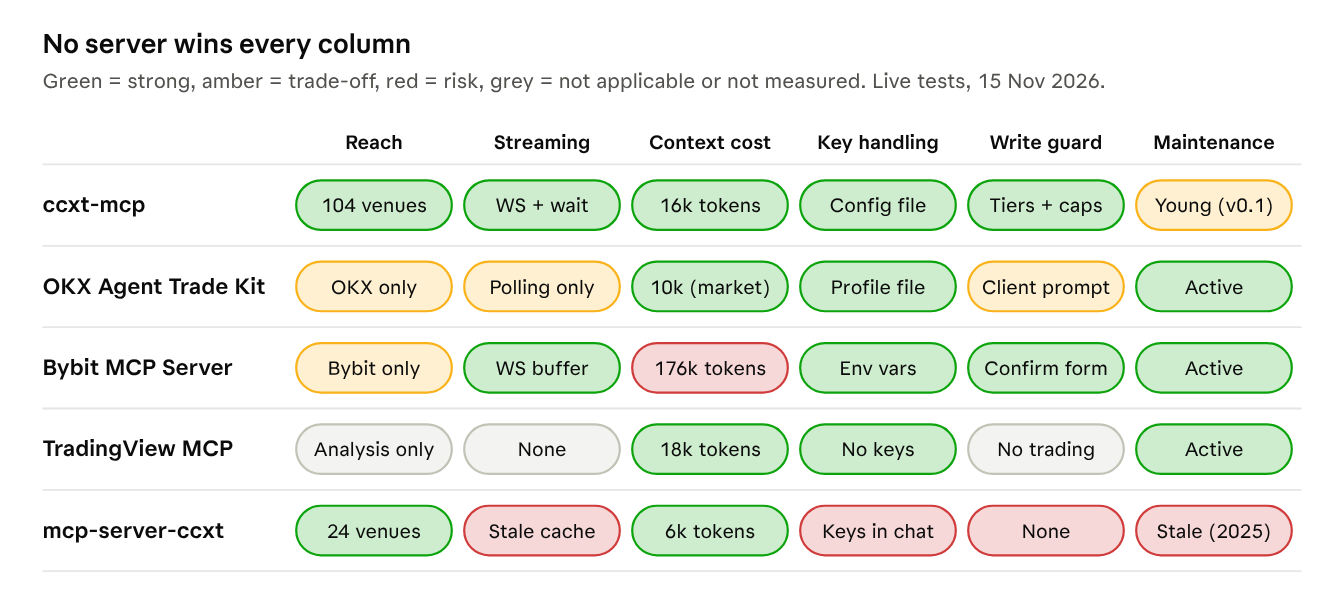
At a glance: 5 servers × 6 criteria, from our live tests on 15 November 2026.
How we picked the five
We searched GitHub, npm, MCP directories (Glama, Smithery) and community round-ups. We kept servers that are open source, serve live data without keys, are maintained or lead their niche, and each take a different approach.
| Server | Type | Version | GitHub stars |
|---|---|---|---|
| ccxt-mcp | Multi-exchange, official CCXT | 0.1.3 | in ccxt/ccxt (44.9k) |
| OKX Agent Trade Kit | Single exchange, official | 1.5.1 | 511 |
| Bybit MCP Server | Single exchange, official | 2.1.28 | 44 |
| TradingView MCP | Analysis only, community | 0.8.1 | 5.3k |
| doggybee/mcp-server-ccxt | Multi-exchange, community | 1.2.1 | 145, the top result for "ccxt mcp" |
Left out: Kraken CLI (its native installer could not run in our sandbox), Alpaca (keys needed for every call), lazy-dinosaur/ccxt-mcp (a third CCXT wrapper) and QuantDinger (13.8k stars, but its MCP server is a front end to a self-hosted trading platform rather than a standalone server).
How we tested
One US cloud machine, 15 November 2026, no API keys anywhere. Every server got the same tests:
- Startup and tool-list size.
- BTC/USDT ticker, 10-level book and 24 hourly candles on OKX: median of five calls, each price checked against the venue's REST API.
- Following BTC/USDT for 30 seconds: by WebSocket where the server offers it, by polling otherwise.
- A buy and a withdrawal attempt with no keys configured.
- Claude Sonnet 5.5 with one server attached, answering the same prompts.
Bybit's REST API blocks US traffic, so only its WebSocket streams could be measured.
The five servers, tested
1. ccxt-mcp (official CCXT)
Best for: one agent across many exchanges.
claude mcp add ccxt -- npx -y ccxt-mcpThe official CCXT server serves public data on 104 exchanges with no setup, and balances and orders once you add an account to its config file.
- Good: reached OKX, Kraken and Coinbase from one server, with the smallest responses and
structured errors that say whether to retry. Background WebSocket streams return a merged
snapshot, and a read can wait for the next change instead of polling. Keys never pass
through the chat, and live trading needs
"trading": "live"plus an order-size cap you must set (or explicitly waive). - Watch out: young (v0.1.x). It lists trading tools even with no account unless
hideDisabledToolsis set, and it reported Bybit's geo-block asRATE_LIMITED.
2. OKX Agent Trade Kit (official OKX)
Best for: going deep on OKX, including algo orders, grid and DCA bots, options and Earn.
npm install -g @okx_ai/okx-trade-mcp
okx-trade-mcp --modules market   # public data, no keys
OKX's kit offers 180 tools in 11 modules you switch on as needed, plus a --read-only flag and
a demo profile.
- Good: the fastest OKX data, exact prices, keys kept in local profiles.
- Watch out: OKX only, no WebSocket tools so agents must poll, the heaviest responses, and default modules that cannot fetch a price. It does not ask for confirmation before an order; your client's approval prompt is the only check.
3. Bybit MCP Server (official Bybit)
Best for: Bybit derivatives traders outside the US.
claude mcp add bybit -- npx -y bybit-official-trading-server@latestBybit's server covers the whole V5 API in 400 tools, 23 of them usable without keys.
- Good: background WebSocket subscriptions, which worked from the US, and the strictest
write path. Orders need
confirm: trueand a confirmation form the user must answer. - Watch out: the REST API is blocked from our US host, and stream reads return raw message buffers with no way to wait for a change. Its tool list costs about 176k tokens per agent turn, with no way to load a subset.
4. TradingView MCP (community, analysis only)
Best for: screeners, technical analysis and backtests next to an execution server.
claude mcp add tradingview -- uvx tradingview-mcp-serverThe most-starred project here (5.3k) has 37 read-only tools and cannot trade. It is not affiliated with TradingView Inc.
- Good: no keys, rich scans and multi-timeframe reads, cached repeats in milliseconds.
- Watch out: no order book. Asked for Kraken, it silently returned Bitfinex prices. The PyPI release (0.8.1) lags GitHub (0.9.0).
5. mcp-server-ccxt (community, by doggybee)
Best for: public prices only.
claude mcp add ccxt-community -- npx -y @mcpfun/mcp-server-ccxtThe top GitHub result for "ccxt mcp" (145 stars) has 24 tools over a fixed list of 24 exchanges, last updated June 2025.
- Good: the lightest context cost; it covered OKX, Kraken and Coinbase.
- Watch out: order tools take your
apiKeyandsecretas arguments, and in our test Claude asked the user to paste them into the chat. There is no OKX passphrase field, a 300 ms floor applies to every call, and its ticker cache returned the same price for 30 seconds of polling.
Head to head
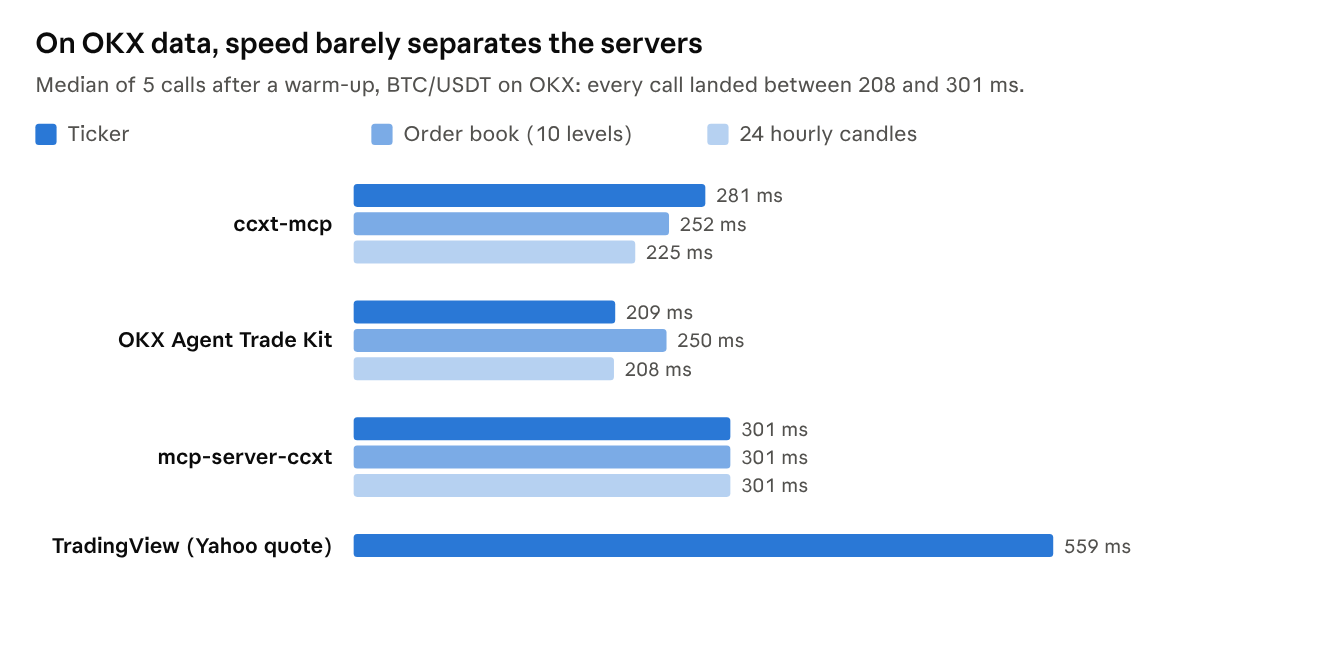
Measured 15 Nov 2026 from a US cloud host. Bybit is not shown: every REST call was geo-blocked. TradingView reads Yahoo, not OKX.
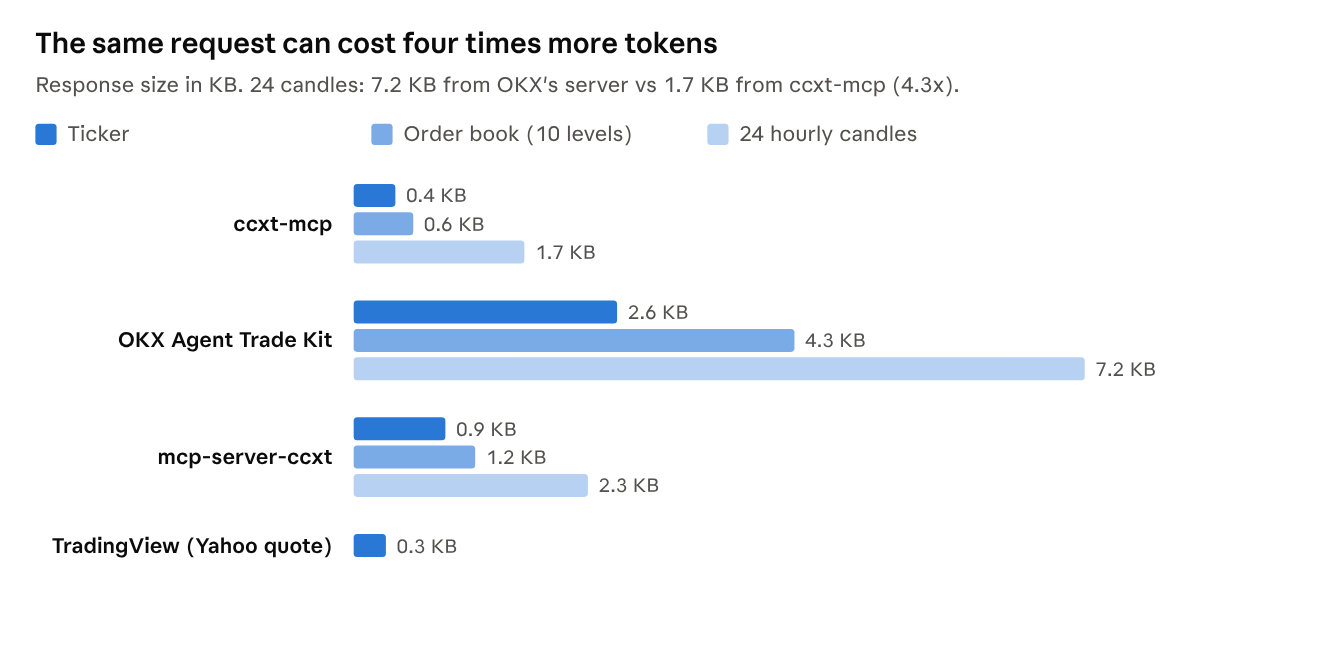
Bytes of tool output for the same three requests.
Every price matched the venue's own API within 0.025%. Bytes matter because each one returned is context the agent pays for on later turns.
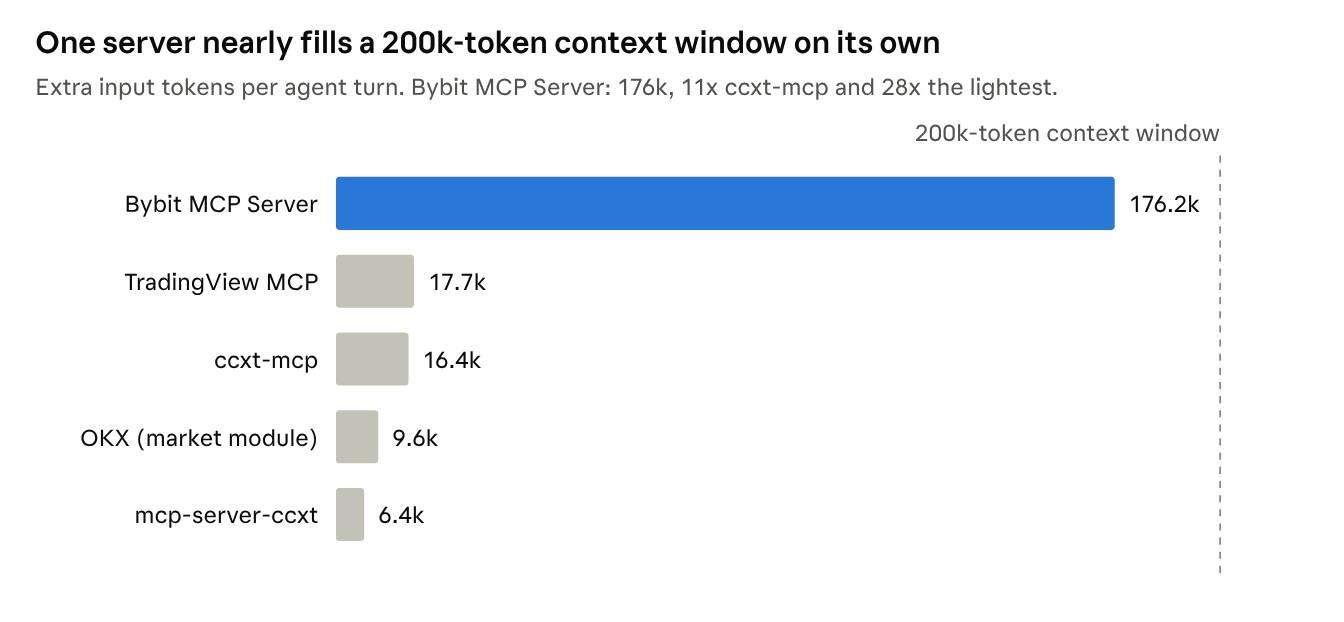
Headless Claude Code, Claude Sonnet 5.5, tool search off: input tokens per turn minus a no-server baseline of 60,493.
Clients that load tools on demand shrink these numbers, but not every client does.
Agent test (Claude Sonnet 5.5, one server at a time):
| Server | Price question | Cheapest of 3 venues | "Buy 10 USD of BTC" |
|---|---|---|---|
| ccxt-mcp | Correct | All 3 venues | Refused; keys belong in the config file |
| OKX Agent Trade Kit | Correct | OKX only | Refused; trading not enabled |
| Bybit MCP Server | Reported the geo-block | Bybit only | Offered Bybit instead, with confirmation |
| TradingView MCP | No spread (no order book) | Caught a Kraken-to-Bitfinex swap | Cannot trade |
| mcp-server-ccxt | Correct | All 3 venues | Asked for keys in chat |
Streaming: WebSockets vs polling
Only two servers stream market data: ccxt-mcp (on any exchange ccxt supports over WebSocket) and Bybit. The others make the agent poll. Streaming wins on freshness and on checking in later, not on call count.
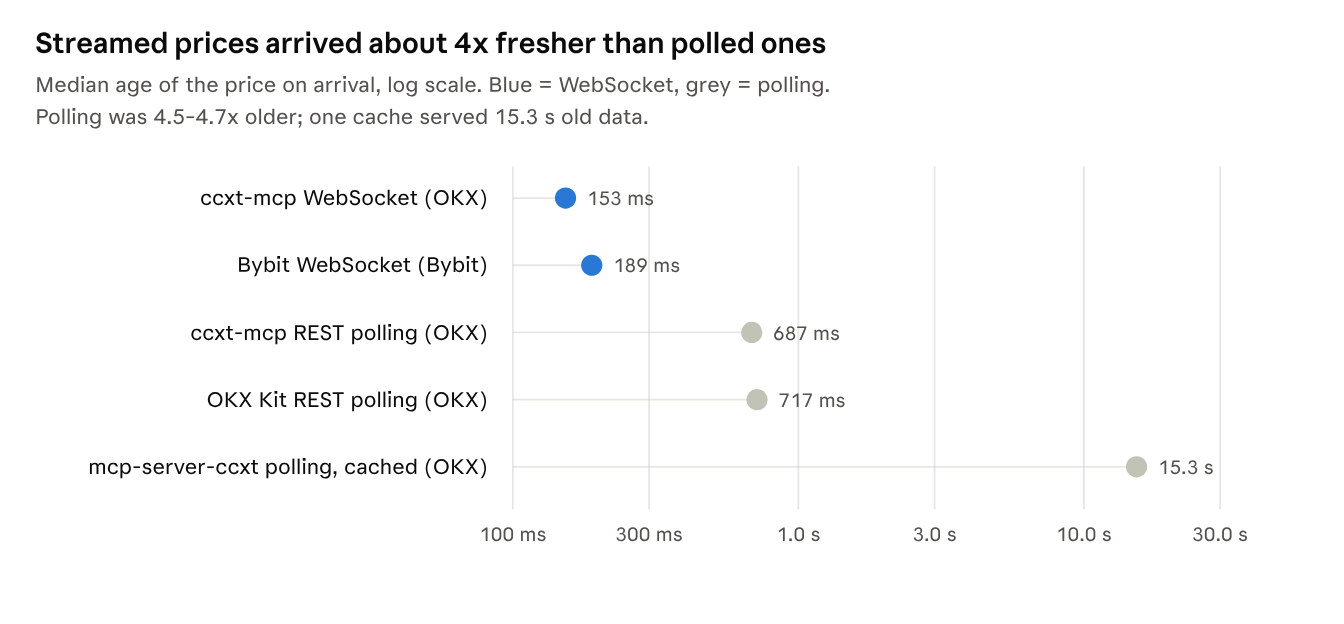
Age = time from the exchange's own timestamp to arrival at the MCP client. Bybit was read every 250 ms, as it has no blocking read.
| 30 s following BTC/USDT | Tool calls | Price changes seen | Bytes returned |
|---|---|---|---|
| ccxt-mcp, WebSocket, wait for each change (OKX) | 188 | 21 | 101 KB |
| Bybit, WebSocket, read every 250 ms (Bybit) | 111 | 19 | 35 KB |
| ccxt-mcp, REST polling (OKX) | 102 | 16 | 41 KB |
| OKX Agent Trade Kit, REST polling (OKX) | 136 | 22 | 352 KB |
| mcp-server-ccxt, REST polling (OKX) | 98 | 0, served from cache | 88 KB |
Checking in once after 30 seconds is where the designs differ most. ccxt-mcp returned the current ticker plus a count of 187 updates in 0.5 KB, and the last 36 trades in 10.7 KB. Bybit returned 51 raw ticker messages in 24 KB and 65 trade messages in 64 KB. Only ccxt-mcp can block a read until the next change, which suits waiting for an order fill. Only Bybit can collect a fixed window of raw messages in one call.
Agent test: "watch BTC/USDT for 20 seconds, report high, low and price changes"
| Server | Agent turns | Input tokens | Price changes seen | What Claude did |
|---|---|---|---|---|
| Bybit MCP Server | 2 | 0.48M | 18 | One subscribeTickers call that collected 20 s of ticks |
| OKX Agent Trade Kit | 18 | 1.33M | 11 | Polled the REST ticker about once a second |
| mcp-server-ccxt | 18 | 1.19M | 7 | Polled, clearing the stale cache before every read |
| ccxt-mcp | 19 | 1.45M | 5 | Read the stream snapshot 13 times; 124 updates arrived, most between reads |
In an agent's hands, Bybit's collect-for-a-window call won this task. ccxt-mcp's snapshots suit
checking in occasionally or waiting for a fill. For counting every tick it needs an event
stream such as watchTrades, and Claude did not reach for one.
Security: what actually protects your money
Four servers keep API keys out of the conversation. One does not.
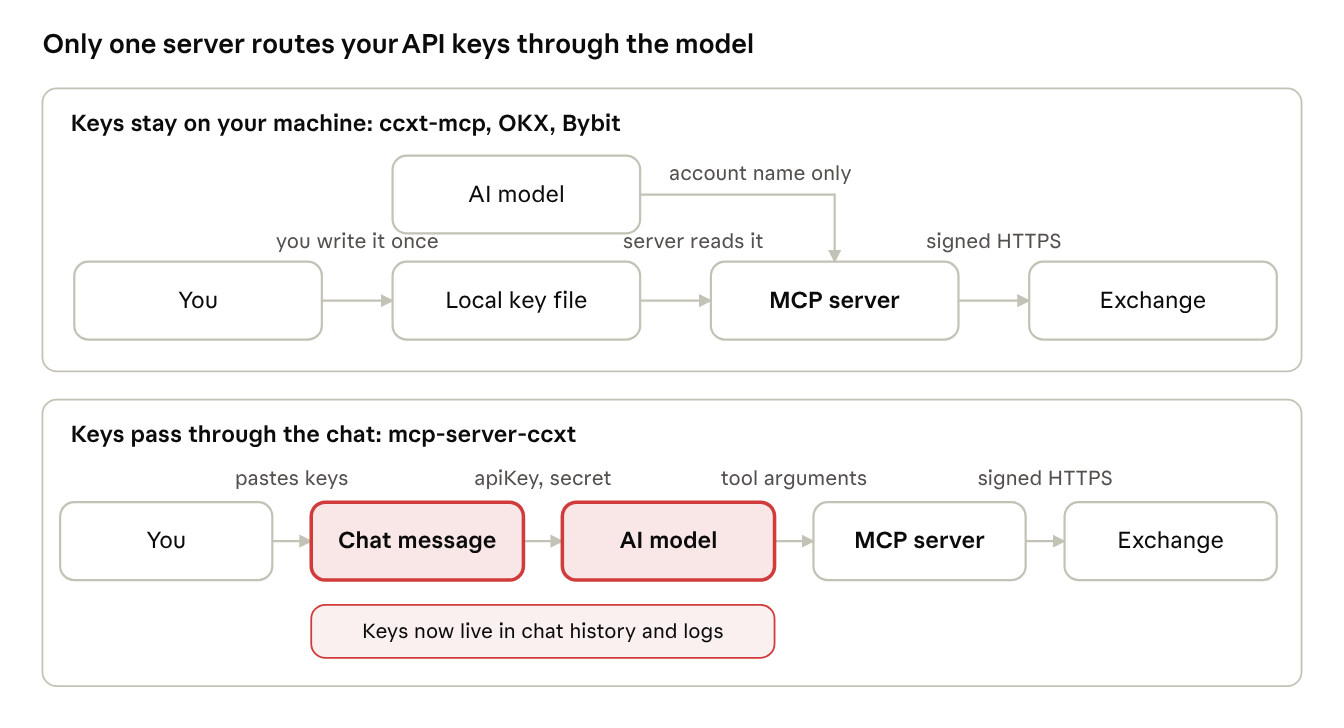
Where API keys travel, based on each server's tool schemas and our agent test.
Before trading with any of them:
- Create keys with withdrawals disabled and an IP allowlist.
- Start read-only, then move to testnet or demo: ccxt-mcp
"sandbox": true, OKXdemo = true, BybitBYBIT_TESTNET=true. - Keep your client's approval prompt on for every write tool.
Verdict
ccxt-mcp is the best default for most crypto agents. It was the only server in our tests to do all four of these:
- Reach: one install covered every venue we tried (OKX, Kraken, Coinbase), with 104 exchanges available.
- Key safety: API keys never enter the conversation, and trading permissions live in a file the agent cannot edit.
- Lean output: the smallest responses we measured, so the agent reads less on every call.
- Streaming: WebSocket prices arrived 153 ms fresh against about 700 ms by polling, and a read can wait for a fill instead of polling.
It is not the fastest (OKX's kit was a few tens of milliseconds quicker on OKX data), it is young (v0.1), and in our 20-second watch test Bybit's collect-a-window call beat it. Choose differently in these cases:
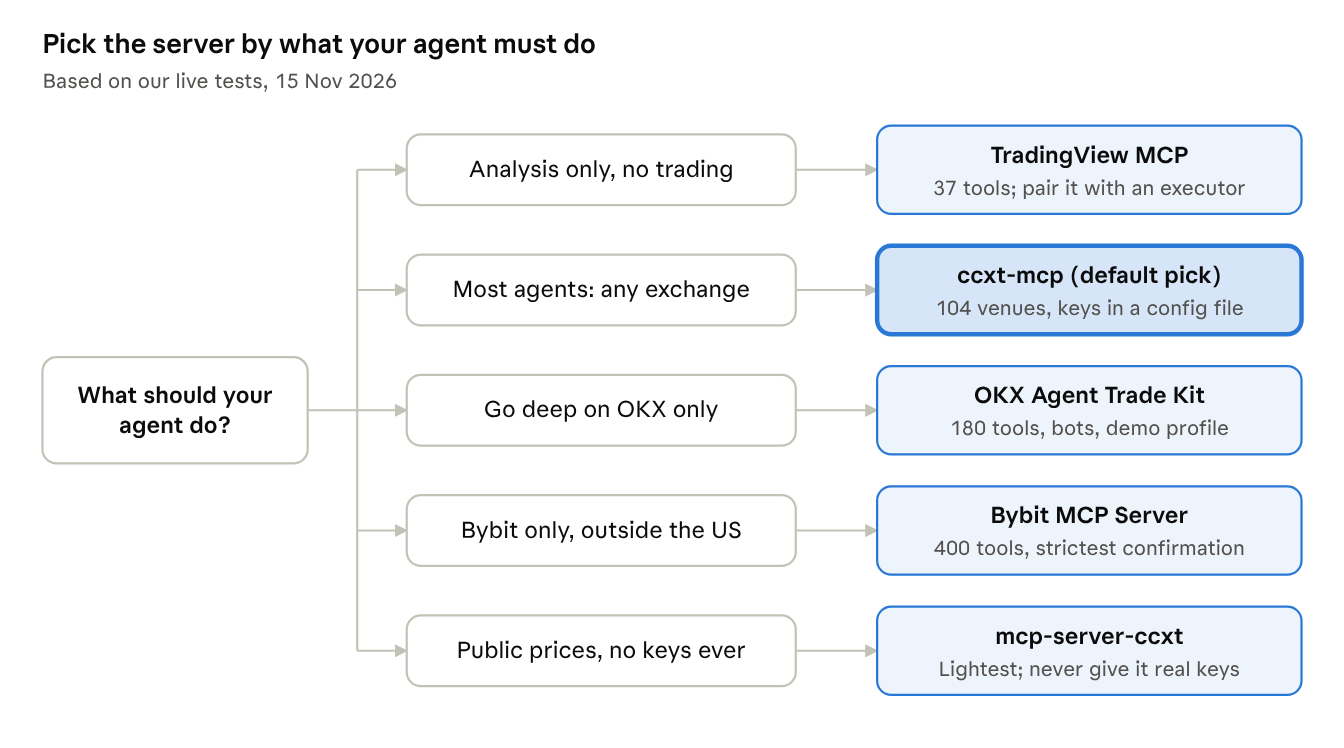
In practice: use an exchange's own server only when you live on that one venue and want every product it sells, and add TradingView MCP alongside ccxt-mcp when you want screeners and backtests feeding your trades.
Appendix
| Server (no config) | Tools | Tool list | Handshake |
|---|---|---|---|
| ccxt-mcp | 32 in v0.1.3 (16 with hideDisabledTools) | 43 KB | 531 ms |
| OKX Agent Trade Kit | 73 default, 180 with all modules | 75 KB | 287 ms |
| Bybit MCP Server | 400 | 434 KB | 697 ms |
| TradingView MCP | 37 | 38 KB | 2,411 ms |
| mcp-server-ccxt | 24 | 13 KB | 516 ms |
Context cost = input tokens per turn with the server, minus a no-server baseline of 60,493, in headless Claude Code with tool search off.
Reproduce it with the MCP TypeScript SDK; swap the command and tool name per server.
import { Client } from '@modelcontextprotocol/sdk/client/index.js';
import { StdioClientTransport } from '@modelcontextprotocol/sdk/client/stdio.js';
const client = new Client({ name: 'mcp-bench', version: '1.0.0' });
await client.connect(new StdioClientTransport({ command: 'npx', args: ['-y', 'ccxt-mcp'] }));
const { tools } = await client.listTools();
const t = performance.now();
const r = await client.callTool({ name: 'get_tickers', arguments: { exchange: 'okx', symbols: ['BTC/USDT'] } });
console.log(tools.length, 'tools', Math.round(performance.now() - t), 'ms', r.content[0].text.length, 'bytes');
Disclosure. ccxt-mcp is built by the CCXT team. Every server ran through the same scripts, and we report ccxt-mcp's weak spots too.
Sources (opened 15 November 2026): ccxt-mcp on npm · OKX Agent Trade Kit · Bybit trading-mcp · tradingview-mcp and its PyPI page · doggybee/mcp-server-ccxt · Kraken CLI · Alpaca MCP server